
Fileset Scripts Overview
Fileset scripts can check eligibility, prepare an installation, activate content, verify the result, and clean up during removal. FileWave organizes those actions into seven activation states:
- Requirements
- Preflight
- Activation
- Postflight
- Verification
- Pre-Uninstallation
- Post-Uninstallation
In FileWave Central, open Filesets, select the Fileset, and click the Scripts toolbar icon. The Scripts dialog groups each script by the activation state where it runs.
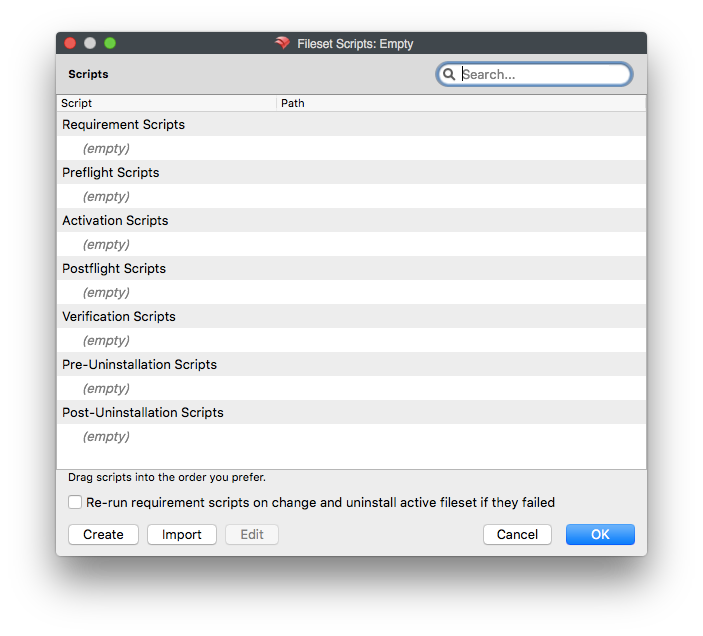
Scripts within the same activation state run from top to bottom. Drag scripts within the list to control their execution order.
FileWave Client scripts run as root on macOS or SYSTEM on Windows. A script that works in your signed-in user session may see different paths, environment variables, permissions, or registry data through FileWave. Test in the execution context and Windows bitness configured for the Fileset; Script Best Practices provides platform-specific testing guidance.
Use the create or import buttons to add a script. On macOS, you can also drag a script from Finder into the dialog. Open an existing script to edit its contents or properties.
Click OK to save changes to the Fileset. Click Cancel to discard the changes.
Double-clicking a script opens the file properties dialog. Most script attributes can be changed in the same way as files in an open Fileset, but some settings are locked because the Fileset workflow depends on them. For example, the Execute flag cannot be cleared. Requirement scripts also cannot be changed between interactive and non-interactive execution because the client must be able to use the script exit code to decide whether the Fileset should download.
The checkbox Re-run requirement scripts on change and uninstall active Fileset if they failed controls the same setting as Evaluate requirements on change and uninstall active Fileset if they failed in the Fileset's Requirements tab. When enabled, a Fileset change makes the client evaluate all requirements again. If any requirement fails, FileWave uninstalls the active Fileset, so test this behavior before enabling it on production targets.
Saving the Fileset is not the same as publishing the change to devices. Before using Update Model, review the Fileset, its targets, and other administrators' pending changes: a Model Update commits shared pending work, not only your script edit. After publication, verify the Fileset result on a test device; a higher model number alone does not show that the script ran successfully. See how FileWave turns changes into device work for the prepare, publish, and verify sequence.
Fileset script types
- Requirements Scripts – Run before the Fileset or its dependencies are downloaded. If any requirement script returns a non-zero exit code, the Fileset and its dependencies are not downloaded or installed.
- Preflight Scripts – Run after dependencies are installed, but before the Fileset downloads. If any preflight script returns a non-zero exit code, the Fileset is not downloaded or installed.
- Activation Scripts – Run when the Fileset is activated.
- Postflight Scripts – Run after the Fileset installation has completed.
- Verification Scripts – Run after postflight scripts and during each verification of the Fileset.
- Pre-Uninstallation Scripts – Run when a Fileset is inactivated, immediately before the Fileset is uninstalled. Use this state when the script needs access to files that self-healing will remove during uninstall.
- Post-Uninstallation Scripts – Run immediately after the Fileset and its dependencies have been uninstalled or removed from the client.
No comments to display
RE: Verification Scripts – A verification script is executed after postflight scripts and upon every "verification of the Fileset."
If possible, it would be informative/useful if there was a description of when every "verification of the fileset" may occur, or a link to a KB describing such information.
In reply to #1
Do you think if https://kb.filewave.com/books/filewave-client/page/executing-a-client-side-script-based-verification were to have more detail on the interval and other causes of verifications that would be the place this fits?
I've linked, 'How the Client Communicates', which has a section on Verify.
In reply to #3
So, just to confirm, verification scripts run:
In reply to #4
Correct on all 3. Those are the times it runs. I suppose a 4th could be if you were to execute a verify directly from a mac or windows machine from command line.
No comments to display