
Force a Reboot After Installing a Fileset (macOS/Windows)
What
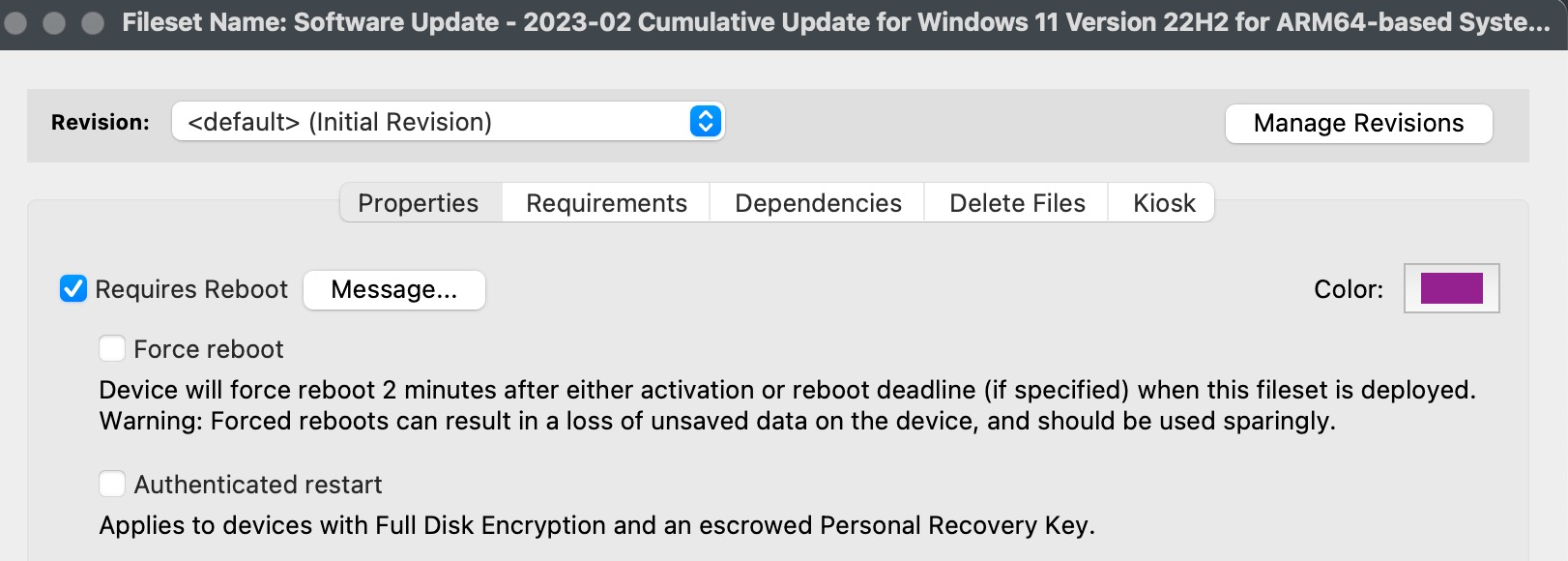
The Force reboot option lets a Fileset reboot macOS or Windows after the Fileset installs. Use it for deployments that cannot finish safely until the device restarts, such as OS or security patches.
When/Why
Requires Reboot controls the restart message and deadline presented to the user. Force reboot tells FileWave to restart the device automatically instead of waiting indefinitely for the user. Review both settings together in the Fileset properties.
How
In FileWave Central, configure the Fileset before deploying it to your pilot devices:
- Highlight the Fileset.
- Select Properties.
- Check Force reboot.
- Save the change.
Forced restarts can interrupt active work. A forced reboot occurs 2 minutes after activation, or 2 minutes after the configured reboot deadline. Pilot the Fileset with representative devices and warn users to save their work before broad deployment.
Saving the Fileset properties alone does not publish the change. Use a Deployment to target the intended pilot devices and review its installation and activation settings. Review pending work with the other administrators before running Update Model: it publishes pending changes from all administrators, not just this Fileset.
After the pilot device receives and activates the Fileset, confirm the Fileset result and the restart on that device before widening the Deployment. A successful Model Update alone does not confirm either result. See How FileWave turns your changes into device work if you need help distinguishing saved changes, publication, and device completion.
No comments to display
No comments to display