
Lock Device
What
You can use Lock device in FileWave Anywhere to remotely lock a managed iOS device. If the device already has a passcode, that same passcode is still required to unlock it. If no passcode exists, the device can be unlocked without one.
When/Why
Use this action when you need to lock the screen of a managed iOS device. It interrupts the user, so confirm the target before sending it. For a routine check-in or inventory refresh, use Send Verify Command instead of locking the screen.
How
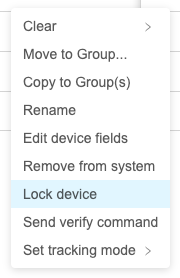
In View - Devices, click the three-dot menu to the right of the device and select "Lock device".
Check whether the lock completed
The device must be able to check in with FileWave to receive the MDM command. Sending the request does not mean an offline device has locked immediately.
Open the device name in Devices, then select Command History in the Device Detail View. Check the lock request: acknowledged means the device processed it; not sent means it is still waiting for the device to check in. Review any returned error rather than treating submission as success. See Apple MDM Command History for the other states.
This screen-lock action is different from locking a FileWave Client to its current Model. See Locking Devices if you need to stop a Client from receiving a newer Model.
No comments to display
No comments to display