
Manual Licenses
Use this workflow to compare reported application or font inventory with the software licenses your organization owns. It is separate from your FileWave Server license and Apple Apps and Books license assignment. In FileWave Central, open License Management. Select New License from the toolbar, give the license a name, and set the license expression to track either an application or a font.
Build the inventory search for the item you want to track, for example Chrome browser. Check that the selected platform and management method actually report the application or font fields used by your expression. The Chrome example illustrates matching inventory; it does not imply that Chrome requires a paid per-device license.
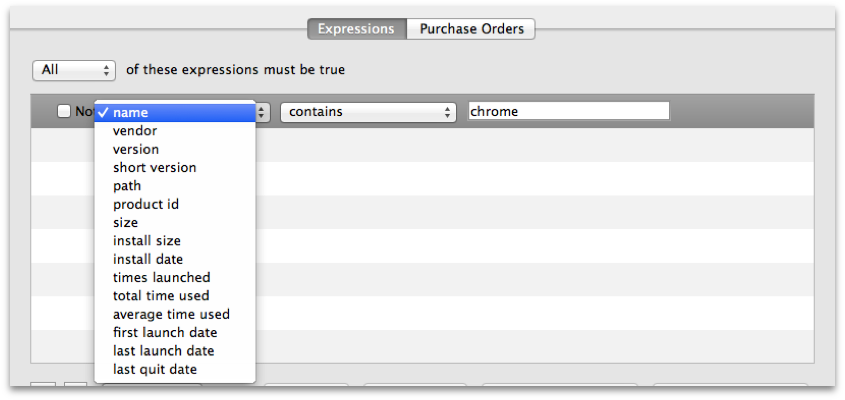
Next, enter the licenses you actually own. You can use purchase order details if you have them, or any internal tracking method that gives you a reliable count. You can add multiple purchases to the same license record, which also gives you a simple history for that item.

Set a warning threshold to flag a low available-license count in License Management. The threshold does not configure email delivery. To email license information, configure Scheduled Reports and Mail preferences.
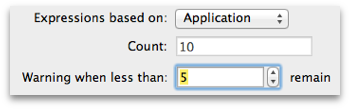
That completes the manual license query. In the License Management pane you can review the current results and compliance state.

Double-click the license entry to view the query details and the device information behind the result. Compare the matching devices with current inventory and confirm that the purchase records reflect the applicable vendor agreement. A compliance label compares the criteria and counts entered in FileWave; it does not independently establish legal entitlement or complete fleet coverage. If the count is unexpected, check the expression, platform scope, inventory freshness, and purchase entries before changing the license count. See License Management for a worked reconciliation example.
No comments to display
No comments to display