
FileWave Central Server and Assistants Menu Reference
FileWave Central groups administrative tools under the Server and Assistants menus. The available Assistants can vary by FileWave version and administrator permissions.
Server menu
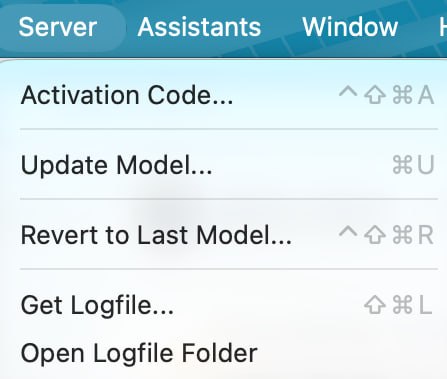
Activation Code…
Opens the FileWave activation details used to license the environment.
Update Model…
Writes pending administrative changes to the FileWave Server database and creates the Model manifest sent to Clients. Update the Model after changing devices, Filesets, Deployments, or other settings that affect managed devices.
Revert to Last Model…
Returns the Server to the previous Model. This does not necessarily undo changes that devices have already completed, so review the affected Deployments and devices before reverting.
Get Logfile…
Open Logfile Folder
Assistants menu
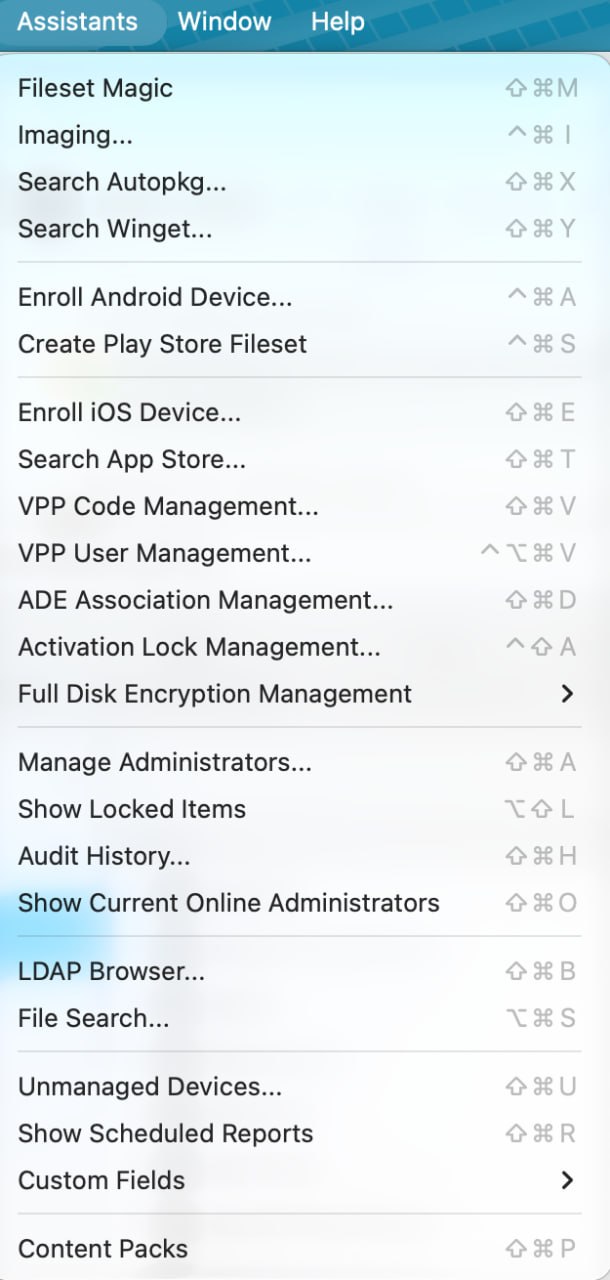
Fileset Magic
Fileset Magic compares snapshots taken before and after software is installed or configured, then builds a Fileset from the detected changes. See Filesets / Payloads for related deployment workflows.
Imaging…
Opens the Imaging pane used to associate disk images with devices for re-imaging. See Network Imaging / IVS.
Search Autopkg…
Searches AutoPkg recipes and creates macOS software Filesets. See AutoPkg with FileWave.
Search Winget…
Searches the WinGet repository and creates a Windows Fileset from the selected package. See Microsoft WinGet Overview.
Enroll Android Device…
Creates Android enrollment tokens for supported Android Enterprise enrollment methods. See Android Enrollment.
Create Play Store Fileset
Creates a Fileset for an application selected from managed Google Play.
Enroll iOS Device…
Opens the assistant for manual Apple MDM enrollment.
Search App Store…
VPP Code Management… / VPP User Management…
ADE Association Management…
Activation Lock Management…
Full Disk Encryption Management
Opens the full-disk-encryption configuration and recovery-key management tools. See FileVault - Getting Started.
Manage Administrators…
Show Locked Items
Audit History…
Show Current Online Administrators
LDAP Browser…
File Search…
Searches for files inside Filesets. Select a result and use Reveal in Fileset to open the Fileset that contains it.
Unmanaged Devices…
Show Scheduled Reports
Custom Fields
Opens the Custom Fields submenu for importing values and editing Custom Field definitions. See Custom Fields.
Content Packs
Opens the Content Packs browser for reviewing and importing packaged FileWave solutions. See How to Import a Content Pack.
No comments to display
No comments to display