
What is the difference between Revert and Restore?
Problem
You need to undo changes to the FileWave model. Revert to Last Model and fwcontrol server restore look alike, but they are very different:
- Revert is the everyday way to throw away changes you have not published yet.
- Restore is a last resort. It brings back an older published model, but it cannot bring back many things that changed since then.
When you work in FileWave Central, your changes are made in the next model. They do not affect managed devices until you update the model.
Resolution
Which one do I need?
| Situation | What to do |
|---|---|
| The changes are not published yet | Use Revert. |
| The changes are already published | Fix the mistake in a new model, or recover from a backup. Use Restore only if neither is possible, and only after contacting FileWave Support. |
Revert
In FileWave Central, go to Server > Revert to Last Model.
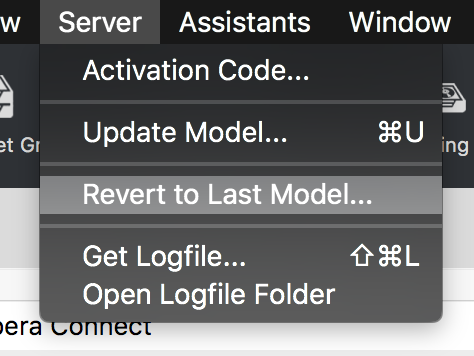
Revert throws away your unpublished changes and takes you back to the model that is currently deployed.
Example: the deployed model is 10. You make some changes that will become model 11 once published:
- You create a Fileset called My Fileset A.
- You delete a Fileset called Old Fileset B.
- You move the association for Fileset C from Group 1 to Group 2.
If you choose Revert to Last Model before updating the model, all three changes are discarded and you are back on model 10. No device ever saw them.
Once you have updated the model to 11, revert no longer helps, because model 11 is now the current model.
Restore (last resort)
Restore is deprecated and will be removed in a future version. Contact FileWave Support before you use it.
What restore does
Restore replaces the whole model in FileWave Central with an older published one. That includes clients, groups, Filesets, associations and Smart Groups.
The server keeps the last 20 models.
What restore does not bring back
- Fileset content. If you deleted a Fileset after that model, the Fileset shows up again but its content is gone. It cannot deploy until you upload the content again.
- Deleted devices. If you deleted a device after that model, it shows up again in FileWave Central, but its MDM enrollment was removed when you deleted it. It will not check in again until it is re-enrolled.
- Enrollment and inventory data. These are not rolled back.
Restore also throws away every change published after that model, including the ones you wanted to keep.
Before you restore
- Contact FileWave Support.
- Check whether you can fix the mistake in a new model instead, for example by re-creating the association or the Fileset you lost.
- If you need lost data back, restore your server backup instead.
Running a restore
sudo fwcontrol server restore 10When the command finishes, quit FileWave Central and open it again. Using the example above, after restoring model 10:
- My Fileset A no longer appears in the Filesets view. Its uploaded content may still be on the server.
- Old Fileset B appears again, but its content is missing.
- The association for Fileset C points back to Group 1.
Additional Information
Why restore is limited
Restore dates from the early, Legacy days of FileWave. Back then, environments were simpler and security requirements were lighter. Devices did not depend on certificates, push registration or MDM enrollment, so rolling back the model recovered almost everything. That is no longer the case. Restore will be removed in a future version.
A regular server backup is the much safer way to recover from a major mistake. See FileWave Server Backup and Restore, or Backup Procedures for FileWave Hosted Servers if FileWave hosts your server.
No comments to display
No comments to display