
Review a Deployment Summary in FileWave Anywhere
What
The Deployment Summary shows the final target scope before you publish a deployment. It lists included devices and groups, standalone targets, exclusions, payloads, and the estimated data size per device.
When/Why
Review the summary before updating the Model. Confirm that the device count, target groups, exclusions, payload list, and download size match the deployment you intended. A Model Update commits pending changes from all administrators, not only the Deployment shown here; review and coordinate that shared work before publishing.
How
If you have not yet selected the content and devices, start with Create Deployment. The summary is the final review of those choices, not an installation-status view.
The summary is read-only. If anything looks wrong, return to the Targets, Payloads, or Options step and correct the deployment before publishing it.
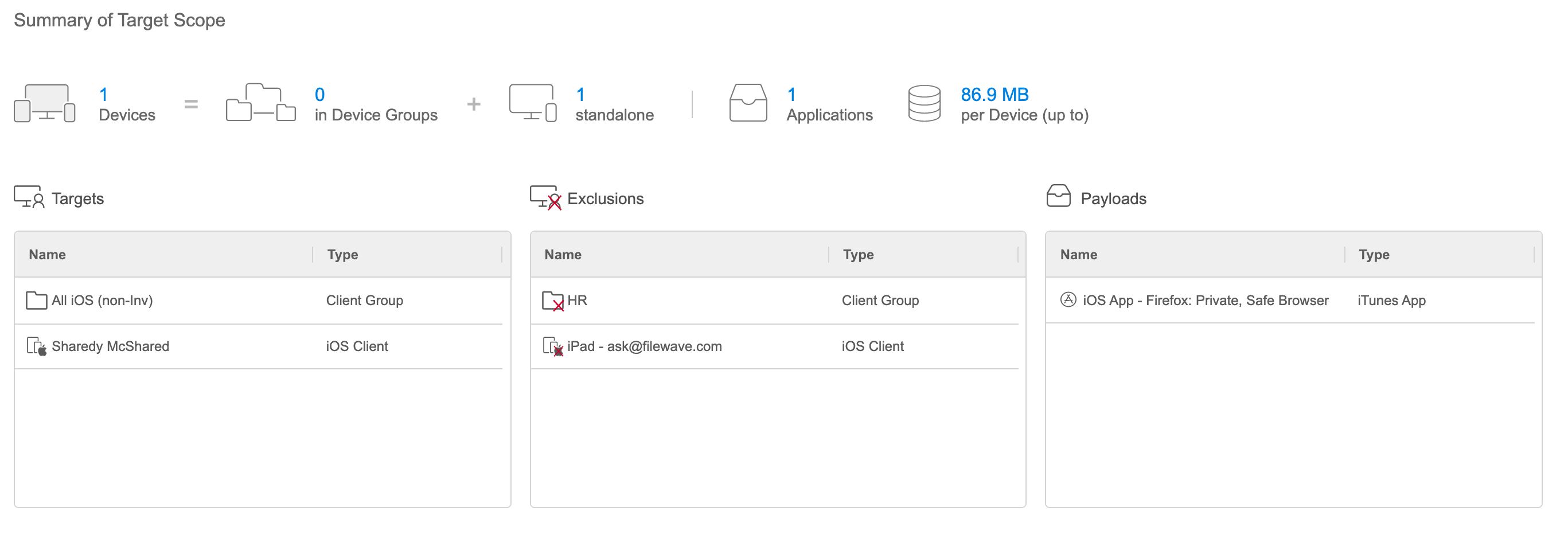
An explicit exclusion overrides an inclusion. For example, a device included through a target group will not receive the payload when that same device is explicitly excluded.
Publish and check the result
Save the completed Deployment, then update the Model after reviewing the shared pending changes. Keeping a Deployment draft is not publication. After the pilot device receives the work, check its delivery status and the installed app version or effective setting. The summary counts and a successful Model Update do not confirm installation; for Kiosk delivery, confirm the user has installed the offered item before treating availability as completion.
No comments to display
No comments to display